Gameplay Guide
A quick overview of common things to know about Sushi.
Network Lines
After launching, click Multiplayer and you'll see several network lines:
| Line | Description |
|---|---|
| Direct | Connect directly to our server machine. Usually laggy if you're not in China. |
| NAT | Worth trying. This network line has slightly lower network load to our machines, and usually turns out great in connection quality. |
| Prime | Low bandwidth, but accessible across the world. You may try this if you're far away from China. |
Ping
Press TAB in-game to open the player list and see your ping. It may show -1 right after joining — wait a moment for it to update.
Proxy Server Commands

Use /server to switch between sub-servers.
Please refer to each modpack's page to see which servers are available for each modpack.
Cross-server Chat
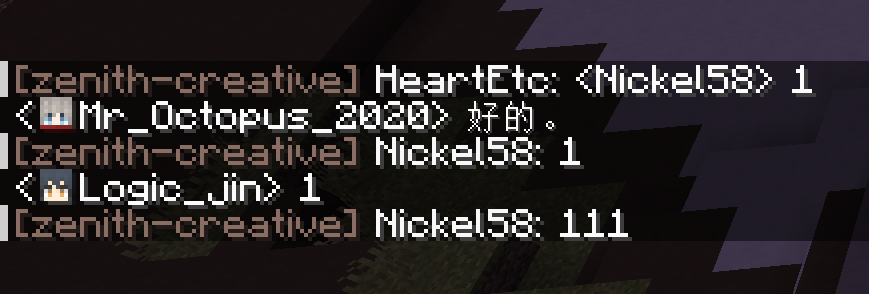
You can see chat from all sub-servers on the SushiMC network. Messages from players on the same server as you appear normally, while messages from other servers are prefixed with the server name before the player name.